Tag: php

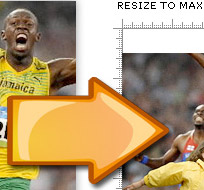
Resize JPEG images using PHP

This is something I have had to do on numerous occasions, and each time I have to look up GD library functions and mess around with several attempts before I get it right, so I figured it was time I wrote a couple of simple PHP functions to handle this. Hopefully you can use them too…

Resize a JPEG to a maximum width and height whilst maintaining the aspect ratio (proportions).

Resize a JPEG whilst maintaining aspect ratio (proportions)

<?php
// LOCATION OF ORIGINAL IMAGE
$orig = "path/to/original_image.jpg";

// DESTINATION OF RESIZED IMAGE
$dest = str_replace(".jpg","_resized.jpg",$orig);

// MAXIMUM NEW WIDTH & HEIGHT (depending on original's aspect ratio)
$w = 200;
$h = 200;

// RUN FUNCTION
ResizeTo($orig,$dest,$w,$h);

// FUNCTION
function ResizeTo($orig,$dest,$h,$w) {
	// GET WIDTH AND HEIGHT OF ORIGINAL
	list($width, $height) = getimagesize($orig);

	// CALCULATE NEW WIDTH AND HEIGHT
	if ($width > $height) {

		// LANDSCAPE
		$new_width = $w;
		$new_height = round($height * ($w / $width));
		if ($new_height > $h) {
			$new_height = $h;
			$new_width = round($width * ($h / $height));
		}

	} else {

		// PORTRAIT
		$new_height = $h;
		$new_width = round($width * ($h / $height));
		if ($new_width > $w) {
			$new_width = $w;
			$new_height = round($height * ($w / $width));
		}
	}

	// OPEN IMAGES IN MEMORY
	$source = imagecreatefromjpeg($orig);
	$thumb = imagecreatetruecolor($new_width,$new_height);

	// RESIZE
	imagecopyresized($thumb, $source, 0, 0, 0, 0,
		$new_width, $new_height, $width, $height);

	// SAVE RESIZED
	imagejpeg($thumb, $dest, 90);

	// DESTROY IMAGES IN MEMORY
	imagedestroy($source);
	imagedestroy($thumb);
}
?>

Sometimes you don’t want to maintain your image’s aspect ratio, you want to resize and crop all images to the same height and width, and for that I created a second function:

Resize and crop a JPEG to a specific width and height

Resize and crop a JPEG to a specific size

<?php
// LOCATION OF ORIGINAL IMAGE
$orig = "path/to/original_image.jpg";

// DESTINATION OF RESIZED IMAGE
$dest = str_replace(".jpg","_croped.jpg",$orig);

// MAXIMUM NEW WIDTH & HEIGHT (depending on original's aspect ratio)
$w = 200;
$h = 200;

// RUN FUNCTION
ResizeCropTo($orig,$dest,$w,$h);

// FUNCTION
function ResizeCropTo($orig,$dest,$h,$w) {

	// GET WIDTH AND HEIGHT OF ORIGINAL
	list($width, $height) = getimagesize($orig);

	// CALCULATE NEW OFFSET POSITION
	if ($width > $height) {

		// LANDSCAPE
		$new_height = $h;
		$new_width = round($width * ($h / $height));
		$y_offset = 0;
		// POSITION IN THE CENTER FOR LANDSCAPE
		$x_offset = ($new_width - $w) / 2);
		if ($x_offset < 0) {
			$new_width = $w;
			$new_height = round($height * ($w / $width));
			$x_offset = 0;
			// WE ERR MORE TO THE TOP ON PORTRAIT
			$y_offset = ($new_height - $h) / 4);
		}

	} else {

		// PORTRAIT
		$new_width = $w;
		$new_height = round($height * ($w / $width));
		$x_offset = 0;
		// WE ERR MORE TO THE TOP ON PORTRAIT
		$y_offset = ($new_height - $h) / 4);
		if ($y_offset < 0) {
			$new_height = $h;
			$new_width = round($width * ($h / $height));
			$y_offset = 0;
			// POSITION IN THE CENTER FOR LANDSCAPE
			$x_offset = ($new_width - $w) / 2); 		}
	}

	// OPEN IMAGES IN MEMORY
	$source = imagecreatefromjpeg($orig);
	$thumb = imagecreatetruecolor($h,$w);

	// RESIZE AND CROP
	imagecopyresized($thumb, $source, $x_offset, $y_offset, 0, 0,
		$new_width, $new_height, $width, $height);

	// SAVE RESIZED
	imagejpeg($thumb, $dest, 90);

	// DESTROY IMAGES IN MEMORY
	imagedestroy($source);
	imagedestroy($thumb);
}
?>


String abstract PHP function

As a web developer, I’m often trying to squeeze text into small spaces, and sometimes the only way is to create a summary, or abstract of the text.

A lot of abstract functions will truncate after n words:

<?php
preg_match('/^([^.!?\s]*[\.!?\s]+){0,n}/', strip_tags($text), $abstract);
echo $abstract[0];
?>

… or truncate after n sentences:

<?php
preg_match('/^([^.!?]*[\.!?]+){0,n}/', strip_tags($text), $abstract);
echo $abstract[0];
?>

… but this isn’t always enough. Three sentences, (or 50 words for that matter), could run anywhere between 150 and 450 characters long, which is a big variation if you only have room to display 180 characters! So here’s my reusable abstract function that will…

… truncate after the last word that appears within your specified character limit:

<?php
function abstract( $string, $len ) {
  if ( strlen($string) > $len ) {
    $pos = ( $len - stripos(strrev(substr($string, 0, $len)), ' ') );
    $sum = substr($string, 0, $pos-1);
    $chr = $sum[strlen($sum)-1];
    if ( strpos($chr, '.,!?;:') ) {
       // STRIP LAST CHAR
       $sum = substr($sum, 0, strlen($sum)-1);
    }
    // ADD ELLIPSIS
    return $sum."&#8230;";
  } else {
    return $string;
  }
}
echo abstract( $string, 180 );
?>


Working with MySQL databases from PHP

If like me, you often forget what your database tables are called, or need to check if a MySQL table has been created successfully, but don’t have access to a handy control panel or interface, you may need to write a small PHP script to fetch the results you need. Here are a few that I find myself using time and time again:

Connect to your MySQL database

<?php
$db_user = 'joe_bloggs';
$db_pass = 'test123';
$db_host = 'localhost';
$db_name = 'my_database';

$db = mysql_connect($db_host, $db_user, $db_pass);
mysql_select_db($db_name , $db);
?>

Get a list of all tables in a database

<?php
$query = mysql_query("SHOW TABLES");
while ($result = mysql_fetch_array($query)) {
  echo $result[0] . "<br>";
}
?>

Get a list of all data in a table

<?php
$db_table = "my_table";
$query = mysql_query("SELECT * FROM '$db_table'");
while ($row = mysql_fetch_assoc($query)) {
  print_r($row) . "<br>";
}
?>


Copyright © 1996-2010 Neil Hillman. All rights reserved.
iDream theme by Templates Next | Powered by WordPress